Choosing software for a growing business is rarely just a technology decision. It can affect how employees work, how information moves between departments, how customers are served, and how efficiently the company operates.
Many businesses start with off-the-shelf software because it is readily available and relatively easy to implement. As operations become more complex, however, businesses may discover that the software no longer fits their workflows. Employees may rely on spreadsheets, perform repetitive data entry, use multiple disconnected systems, or create manual workarounds to complete everyday tasks.
At that point, custom software becomes an option. But does a business really need software built specifically for its operations, or would an existing solution still be the better choice?
This guide compares custom software vs off-the-shelf software across cost, flexibility, scalability, integration, productivity, and long-term business value. It will help business owners and decision-makers determine which approach makes more sense for their organization.
What Is Custom Software?
Custom software is an application developed specifically around the requirements of a particular business. Instead of selecting an existing product and adapting business processes to its features, the software is designed around the company’s workflows, users, data, and objectives.
A custom application could be relatively focused, such as an internal management system, or much broader, such as a platform connecting sales, inventory, customer management, reporting, and operations.
The key advantage is that the business has greater control over how the system works. Features, permissions, workflows, dashboards, integrations, and automation can be designed according to actual operational requirements.
Custom software is particularly valuable when a company has processes that are difficult to manage using standard applications.
What Is Off-the-Shelf Software?
Off-the-shelf software is a commercially available product designed to serve many businesses or users. Common examples include accounting software, customer relationship management platforms, project management applications, communication tools, and inventory systems.
The primary benefit is convenience. A business can usually subscribe to or purchase the software, configure it, train employees, and begin using it without commissioning a complete development project.
For businesses with straightforward requirements, this can be a highly practical approach.
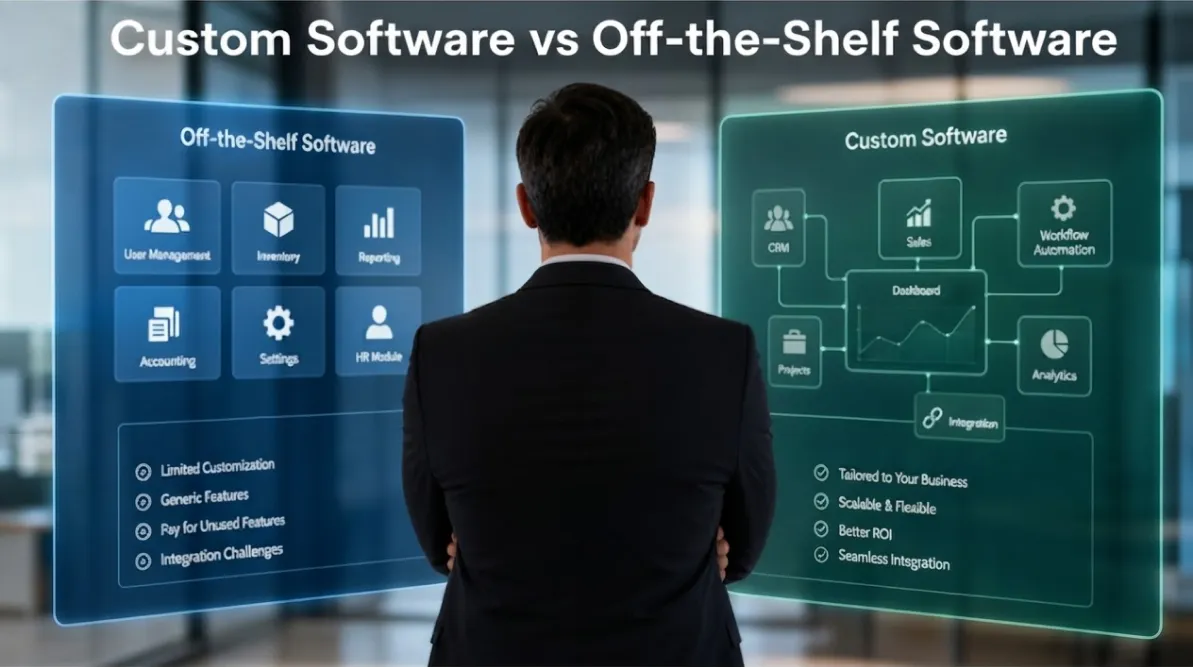
The limitation is that the company must generally work within the functionality and rules established by the software provider. Additional features may require upgrades, extensions, integrations, or changes to the company’s existing processes.
Custom Software vs Off-the-Shelf Software: The Key Difference
The biggest difference is how the software fits the business.
With off-the-shelf software, the product already exists and the business determines how well it can adapt to the available functionality.
With custom software, the development process begins with the business requirements and creates functionality around those needs.
Neither approach is automatically better.
A small business with standard accounting requirements, for example, may have no practical reason to develop its own accounting platform. An organization with highly specialized workflows and multiple disconnected systems may find that an off-the-shelf solution creates more operational problems than it solves.
The right choice depends on the business problem.
When Off-the-Shelf Software Is the Better Choice
Off-the-shelf software is often appropriate when a business has common requirements that are already well supported by established platforms.
If a company needs basic project management, accounting, email marketing, appointment scheduling, document management, or CRM functionality, an existing platform may provide everything necessary.
Implementation speed is another major advantage. Businesses can often begin using the software much sooner than they could with a custom development project.
There is also less responsibility for maintaining the core platform. The software provider generally handles product updates, infrastructure, feature development, and technical maintenance.
For businesses that want a proven solution without a large initial development project, off-the-shelf software can be a sensible investment.
When Custom Software Becomes More Valuable
Custom software becomes more attractive when the business has requirements that standard software cannot handle efficiently.
This can happen when a company has unique approval processes, specialized calculations, complex workflows, unusual reporting requirements, or multiple systems that need to communicate.
Another common situation is when employees spend significant amounts of time working around existing software limitations.
For example, a business might use a CRM for customer information, spreadsheets for inventory, email for approvals, and another application for reporting. Employees may repeatedly copy information from one system to another.
The problem is not necessarily that any individual system is bad. The problem is that the overall technology environment does not support the way the business operates.
Custom software can potentially bring these processes together into a more connected workflow.
Comparing the Cost of Custom and Off-the-Shelf Software
Cost is one of the first considerations for most businesses, but the initial price does not tell the entire story.
Off-the-shelf software generally has a lower entry cost. Depending on the product, businesses may pay monthly or annual subscriptions based on users, features, usage, or storage.
However, long-term expenses can include additional user licenses, premium features, integrations, implementation services, customization, and multiple software subscriptions.
Custom software typically requires a larger upfront investment because it involves requirements analysis, planning, design, development, testing, deployment, and ongoing maintenance.
However, the business may gain value from eliminating manual processes, consolidating systems, reducing repetitive work, or creating workflows that existing products cannot support.
The better financial comparison is therefore total cost versus business value, not simply monthly subscription versus development cost.
Flexibility and Customization
Flexibility is one of the strongest advantages of custom software.
An off-the-shelf platform can provide configuration options, plugins, extensions, and integrations, but the business remains dependent on what the provider supports.
Custom software allows the organization to define how specific processes should operate.
For example, a company could have a customized approval workflow where an employee submits a request, a department manager reviews it, finance verifies the budget, and management receives an automated notification before final approval.
If this workflow is central to the company’s operations, having software designed around it may provide significant efficiency improvements.
Integration With Existing Systems
Businesses increasingly rely on several digital tools at the same time.
A typical organization may use a website, CRM, accounting platform, inventory system, payment gateway, email platform, customer portal, and internal reporting tools.
When these systems operate independently, employees may have to transfer information manually.
This creates additional work and can increase the risk of inconsistent or outdated information.
Off-the-shelf platforms may provide APIs and integrations that solve some of these problems. However, the available integrations depend on the platforms involved.
Custom software can be designed to connect specific systems and create workflows that match the organization’s requirements.
This makes software integration an important factor when deciding between the two approaches.
Scalability and Business Growth
Software should not only solve today’s problems. It should also support the organization’s future development.
An off-the-shelf application may work extremely well when a business is small. As the company adds employees, customers, products, locations, or processes, however, the limitations of the platform may become more noticeable.
Custom software can be designed with future requirements in mind.
New modules, user roles, workflows, integrations, and reporting capabilities can potentially be added as the business develops.
However, scalability depends on good planning and software architecture. Custom development does not automatically guarantee a scalable system.
The development strategy needs to account for expected growth from the beginning.
Employee Productivity and Workflow Efficiency
The software employees use every day can have a direct effect on productivity.
When employees need to enter the same information multiple times, switch between several applications, or manually prepare reports, valuable time can be lost.
A well-designed custom system can simplify these workflows by automating repetitive tasks and presenting relevant information in one place.
This does not mean every manual task should be automated. Instead, businesses should identify processes where automation provides measurable value.
The objective should be to help employees spend less time managing administrative processes and more time performing work that contributes to business results.
Security and Data Control
Security should be considered regardless of which software approach a business chooses.
Established off-the-shelf providers may have dedicated resources for infrastructure, security monitoring, updates, backups, and maintenance.
Custom software can provide greater control over data structures, permissions, user roles, hosting environments, and system functionality.
However, that control comes with additional responsibility. Custom applications need to be properly maintained, updated, secured, monitored, and backed up.
Businesses should therefore evaluate the actual security practices behind a solution rather than assuming that custom or off-the-shelf software is automatically more secure.
The Risks of Choosing the Wrong Software
The wrong software decision can create problems that become increasingly expensive over time.
A business may initially choose a cheap solution, only to discover that employees need several additional tools to complete their work.
Another company may invest heavily in custom software without clearly defining its requirements, resulting in unnecessary features, complicated workflows, and development costs that could have been avoided.
The solution is not simply to choose the more expensive option.
Businesses should first understand their processes, identify their most important requirements, and determine what problems the software is expected to solve.
How to Decide Which Software Is Right for Your Business
Evaluate Your Current Processes
Start by documenting how work is currently completed.
Look at sales, operations, finance, customer service, inventory, reporting, and other important areas.
Identify repetitive tasks, duplicated data entry, manual approvals, disconnected systems, and processes that regularly cause delays.
This provides a clearer picture of what your software actually needs to accomplish.
Separate Essential Requirements From Nice-to-Have Features
Create a list of requirements and divide them into essential and optional functionality.
If an off-the-shelf platform meets the essential requirements without significant workarounds, it may be the most practical option.
If important business processes cannot be supported without major compromises, custom software may deserve further evaluation.
Consider Your Future Requirements
Do not evaluate software based only on your current size.
Consider where the company expects to be in the next three to five years.
If you expect significant increases in customers, employees, transactions, locations, or operational complexity, the scalability of your software becomes more important.
Consider the Total Cost of Ownership
Look beyond the initial price.
For off-the-shelf software, consider subscriptions, licenses, integrations, premium features, implementation, and additional applications.
For custom software, consider development, hosting, maintenance, support, security, updates, and future enhancements.
This provides a more realistic comparison.
Measure Potential Business Value
Finally, ask what the software can actually improve.
Can it reduce manual work? Can it improve reporting? Can it reduce errors? Can it help employees serve customers faster? Can it connect disconnected systems?
The stronger the measurable business impact, the stronger the case for investing in a more tailored solution.
Strategic Scenario: When Custom Software Makes More Sense
Consider a growing distribution company that initially uses a spreadsheet, a standard CRM, and separate inventory software.
When the company is small, the arrangement works reasonably well.
As sales increase, employees begin entering customer information into multiple systems. Inventory requests are communicated through email, reports are manually prepared, and management has difficulty getting a complete view of operations.
The business could continue purchasing additional tools and developing manual workarounds.
Alternatively, it could evaluate whether a custom platform could connect customer management, inventory, order processing, approvals, notifications, and reporting.
The objective would not simply be to replace existing software. It would be to redesign the workflow around how the business actually operates.
In this scenario, custom software could become a strategic investment because it addresses an operational problem rather than simply adding another technology product.
FAQs
Is custom software better than off-the-shelf software?
Neither option is automatically better. Off-the-shelf software is often suitable for standard business requirements, while custom software is more appropriate when a company has specialized workflows or integration requirements.
Is custom software more expensive?
Custom software generally requires a higher initial investment because it is developed specifically for the business. However, it may provide long-term value by reducing manual work, consolidating systems, and improving operational efficiency.
When should a small business consider custom software?
A small business should consider custom software when existing tools are creating significant inefficiencies or cannot support important processes. Company size alone should not determine the decision.
Can custom software integrate with existing business systems?
Yes. Custom applications can be designed to integrate with websites, databases, CRMs, accounting platforms, payment systems, and other applications where suitable integration methods are available.
How long does custom software development take?
The timeline depends on the scope and complexity of the project. A focused internal application can have a very different development timeline from a large platform involving multiple departments and integrations.
Can businesses use off-the-shelf software before moving to custom software?
Yes. Many businesses begin with existing platforms and later develop custom software as their processes become more complex. This can be a practical way to grow technology investment alongside business requirements.
What should businesses consider before developing custom software?
Businesses should evaluate their processes, requirements, integrations, security needs, budget, scalability requirements, and expected return on investment. Clear planning before development can significantly reduce unnecessary cost and complexity.
The decision between custom software vs off-the-shelf software should be based on the specific needs and objectives of the business.
Off-the-shelf software can be an excellent choice when a company has standard requirements and needs a solution that can be implemented quickly. Custom software becomes more compelling when the organization has specialized workflows, disconnected systems, complex requirements, or long-term operational challenges that existing platforms cannot adequately address.
The most important step is to understand the business problem before selecting the technology.
When business processes, software development, integrations, security, scalability, and long-term goals are considered together, companies can make technology decisions based on business value rather than simply comparing software features.
The right software should make the business more efficient, easier to manage, and better prepared for growth.