Manual work is often accepted as part of running a business until the volume becomes difficult to manage.
Employees may spend hours copying information between systems, preparing reports, sending routine notifications, updating spreadsheets, processing requests, and following up on tasks that could potentially be handled automatically. While each activity may only take a few minutes, repetitive work can consume a significant amount of employee time over weeks and months.
For growing businesses, this creates a scalability problem. Increasing sales and customers should create opportunities for growth, but if every additional transaction also creates more manual administrative work, operational costs can rise quickly.
Business software automation provides a way to address this problem by using software to perform repetitive, rule-based processes with limited human intervention.
This article explains how business software automation reduces manual work, which processes are suitable for automation, how automation affects productivity and accuracy, and what businesses should consider before implementing an automated workflow.
What Is Business Software Automation?
Business software automation involves using technology to perform repetitive business tasks according to predefined rules or workflows.
Instead of requiring an employee to manually initiate every step, software can trigger actions when specific conditions are met.
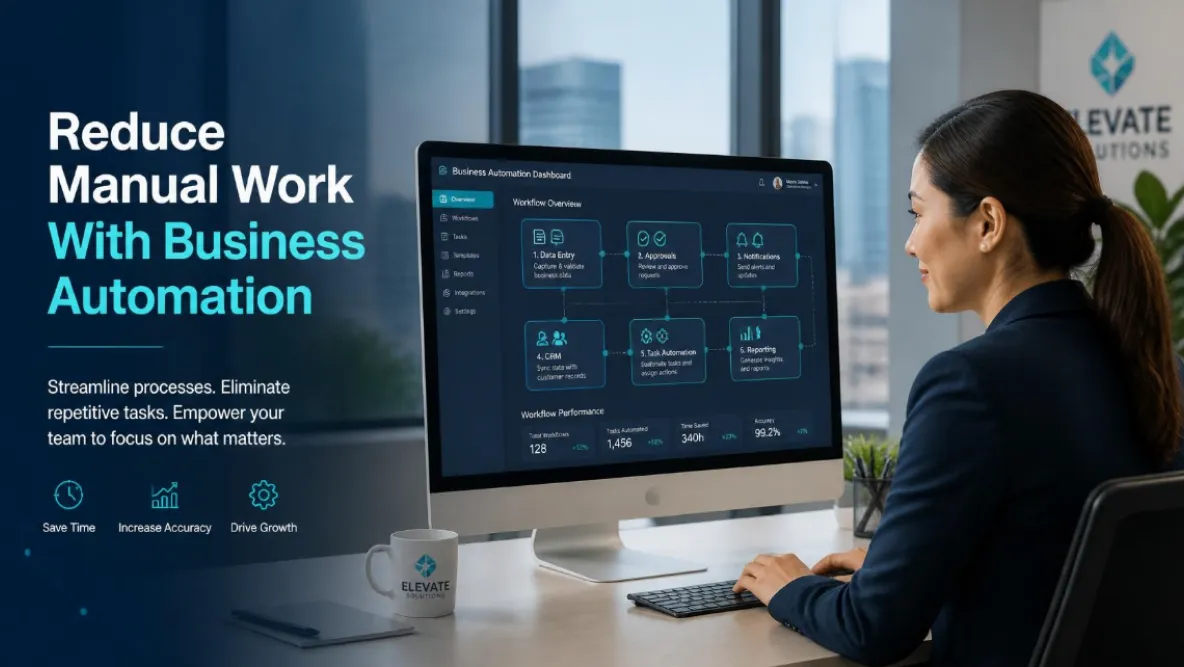
For example, when a customer submits an online inquiry, an automated workflow could create a customer record, assign the inquiry to the appropriate employee, send a confirmation message, and create a follow-up task.
The employee remains responsible for the parts of the process that require judgment or personal interaction, while the software handles repetitive administrative steps.
The objective is not simply to remove people from a process. It is to make better use of employee time.
Why Manual Work Becomes a Problem as Businesses Grow
Manual processes are not always inefficient when a business is small.
A company with a few customers and employees may be able to manage its operations using spreadsheets, email, and basic software.
As the business grows, however, the volume of work increases.
More customers mean more records. More transactions mean more data entry. More employees mean more approvals and coordination. More products or services mean more operational complexity.
Processes that once required a few minutes can eventually consume hundreds of employee hours.
This is where automation can become strategically valuable.
How Business Software Automation Reduces Manual Work
1. Automating Data Entry
Data entry is one of the most common sources of repetitive work.
Employees may need to enter the same customer, order, employee, or transaction information into several systems.
Automation can transfer relevant information between connected applications or populate records based on information already provided by the user.
For example, a customer completing an online form could automatically create a record in a CRM without an employee manually copying the information.
Reducing duplicate data entry saves time and can also reduce errors.
2. Automating Notifications and Reminders
Employees frequently spend time sending routine notifications.
These could include appointment reminders, payment notifications, task alerts, approval requests, follow-up reminders, or internal status updates.
Software can trigger these notifications based on predefined conditions.
For example, a system could notify a manager automatically when an approval request reaches a particular stage.
This reduces the need for employees to remember and manually initiate every communication.
3. Automating Approval Workflows
Many businesses rely on approvals for purchases, expenses, quotations, documents, leave requests, or operational tasks.
When these approvals are managed through email, it can be difficult to determine which requests are pending and who needs to take action.
An automated workflow can route each request to the appropriate person based on predefined rules.
The system can record the approval status and notify the relevant employees when action is required.
This creates greater visibility while reducing administrative follow-up.
4. Automating Report Generation
Reports are important for decision-making, but preparing them manually can consume significant time.
Employees may need to collect information from multiple sources, organize spreadsheets, calculate figures, and format reports.
Automated reporting can collect relevant information and present it through dashboards or scheduled reports.
Management can then spend less time preparing information and more time interpreting it.
The exact reporting approach will depend on the systems and data available within the business.
5. Automating Task Assignments
Workflows often require employees to complete specific tasks after an event occurs.
For example, when a new customer becomes an active client, several internal tasks may need to be created.
Instead of a manager manually assigning every task, software can create and distribute tasks based on predefined rules.
This can improve consistency and reduce the risk of important steps being forgotten.
6. Automating Customer Follow-Ups
Following up with customers is important, but manually tracking every follow-up can be difficult as the customer base grows.
Software can create reminders based on customer activity, transaction status, or predefined timelines.
For example, a sales representative could automatically receive a reminder when a lead has not received a follow-up within a specified period.
Automation can support the sales process without replacing the personal interaction that customers expect.
7. Automating Document Generation
Businesses often create repetitive documents such as quotations, invoices, reports, confirmations, contracts, or internal forms.
If the information is already stored within the business system, software can potentially generate documents using predefined templates.
This reduces repetitive formatting and data entry while creating greater consistency across documents.
How Automation Improves Employee Productivity
Automation can change how employees spend their working hours.
Without automation, employees may spend a significant portion of their day performing administrative tasks.
With appropriate automation, employees can spend more time on activities that require communication, problem-solving, creativity, analysis, and decision-making.
For example, a sales employee should ideally spend more time speaking with prospects and customers rather than manually updating multiple databases.
Similarly, an operations manager can focus on resolving issues and improving processes rather than constantly checking spreadsheets for updates.
The productivity benefit comes from reallocating employee time toward higher-value work.
How Automation Can Reduce Human Error
Manual processes introduce opportunities for mistakes.
Employees can enter incorrect information, forget to complete a step, send information to the wrong person, or update one system without updating another.
Automation can reduce certain types of errors by applying consistent rules.
For example, a system can automatically calculate a value, require required information before allowing a process to continue, or send information to the appropriate department based on predefined conditions.
Automation does not eliminate all errors. Poorly designed automation can create its own problems.
That is why workflows should be tested carefully before being implemented across the business.
Business Software Automation and System Integration
Automation becomes even more powerful when different business systems can communicate with each other.
A company may use a website, CRM, accounting platform, inventory system, payment gateway, customer portal, and internal management application.
If these systems are disconnected, employees may have to manually transfer information.
Integrating them can allow one event to trigger actions across several systems.
For example, a completed order could update customer information, trigger an inventory adjustment, create a financial record, and notify the operations team.
The exact capabilities depend on the systems involved, but integration can significantly reduce unnecessary manual work.
Which Business Processes Should Be Automated?
Not every process should be automated.
The best candidates are usually tasks that are repetitive, predictable, time-consuming, and governed by clear rules.
Repetitive Administrative Tasks
Routine data entry, notifications, document generation, and status updates are often strong candidates.
Data Transfer
If employees repeatedly copy information between systems, integration and automation may reduce this workload.
Approval Processes
Structured approvals can often be automated when the rules and decision-makers are clearly defined.
Reporting
Recurring reports based on consistent data can potentially be automated through dashboards or scheduled reporting.
Customer Communication
Routine confirmations, reminders, and status notifications can often be automated while leaving personalized communication to employees.
When Automation Should Not Replace Human Decisions
Automation should be used strategically.
Some processes require judgment, empathy, negotiation, creativity, or complex decision-making.
For example, a customer complaint may require a human response even if the system automatically creates the support ticket and assigns it to the appropriate employee.
The goal should be to automate the administrative parts of a process while preserving human involvement where it creates value.
A useful question is not “Can we automate this?” but rather “Which parts of this process should technology handle, and which parts require people?”
Custom Software and Business Automation
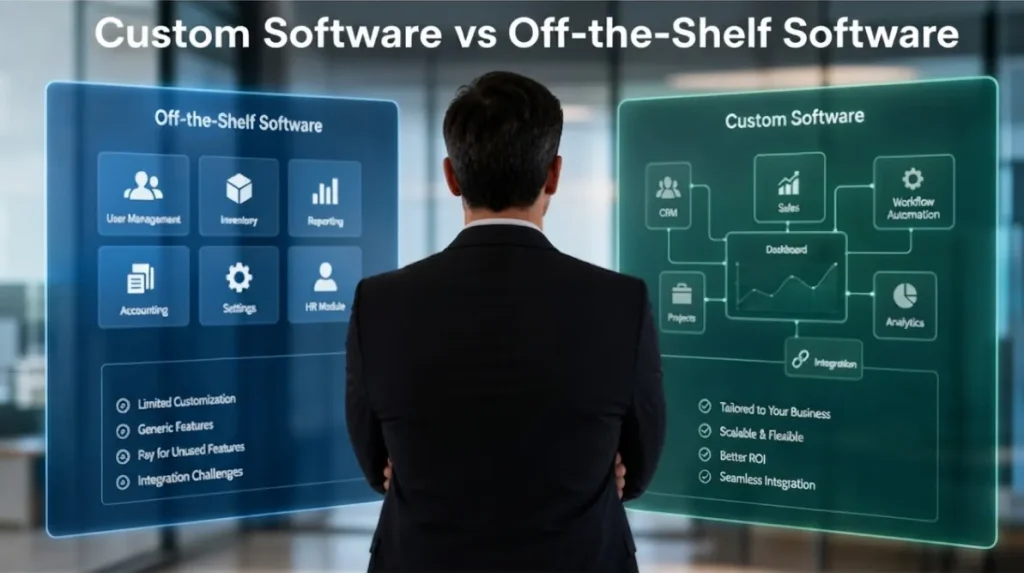
Off-the-shelf software can automate many standard processes.
However, businesses with specialized workflows may eventually encounter limitations.
A company may need automation that depends on unique approval rules, internal calculations, specific customer requirements, or integrations that standard platforms do not support.
This is where custom business software can become useful.
A custom solution can be designed around the organization’s actual workflow and automate processes that are difficult to support using generic applications.
Custom development should still begin with process analysis. Automation should solve a clearly identified business problem rather than simply add complexity.
How to Start Automating Your Business Processes
Identify Repetitive Work
Begin by documenting the tasks employees perform repeatedly.
Look for processes involving spreadsheets, manual data entry, email reminders, repeated approvals, report preparation, and system switching.
Measure the Time Involved
Estimate how much employee time each process consumes.
A task that takes ten minutes may not appear significant, but if it is performed hundreds of times every month, the total cost can be substantial.
Map the Workflow
Document each step from beginning to end.
Identify where information enters the process, where decisions occur, and where employees currently intervene.
This helps determine which steps can be automated.
Evaluate Existing Software
Before developing a custom solution, determine whether your current systems already provide automation capabilities.
You may be able to solve the problem through configuration, integrations, or workflow tools.
Develop Custom Automation When Necessary
If existing software cannot support the required workflow, custom software or custom integrations may be appropriate.
The solution should be designed around measurable business outcomes.
Strategic Scenario: Automating a Manual Customer Process
Consider a growing service business that receives customer inquiries through its website.
Previously, an employee checked the website several times a day, copied customer information into a spreadsheet, emailed the appropriate salesperson, and manually sent a confirmation to the customer.
As inquiry volume increased, response times became inconsistent.
The company introduces an automated workflow.
When a customer submits an inquiry, the system creates a customer record, assigns the lead based on predefined criteria, sends a confirmation message, and creates a follow-up task for the salesperson.
The employee is no longer responsible for manually moving every inquiry through the initial workflow.
The sales team can focus on contacting qualified prospects while management gains greater visibility into the status of incoming leads.
The improvement does not come from automation alone. It comes from redesigning the process around how the business needs to operate at a larger scale.
Measuring the Business Impact of Automation
Automation should be evaluated using measurable results.
Businesses can track metrics such as processing time, employee hours saved, data entry errors, response times, number of manual steps, processing capacity, and administrative costs.
For example, if a process previously required 20 employee hours per week and automation reduces it to five hours, the business has a measurable productivity improvement.
These measurements also help management determine whether additional automation projects are worth pursuing.
FAQs
What is business software automation?
Business software automation uses technology to perform repetitive business tasks according to predefined rules and workflows. It can reduce manual data entry, notifications, approvals, reporting, and other administrative activities.
What tasks should businesses automate first?
Start with repetitive, predictable tasks that consume significant employee time. Data entry, routine notifications, approvals, reporting, document generation, and system-to-system data transfers are often good candidates.
Can business automation reduce operating costs?
It can reduce certain operating costs by lowering the amount of manual work required for repetitive processes. The actual savings depend on the process, employee time involved, automation cost, and volume of work.
Does automation replace employees?
Effective automation generally aims to reduce repetitive administrative work rather than eliminate the need for employees. It allows people to spend more time on activities that require judgment, communication, problem-solving, and customer interaction.
Can automation work with existing business software?
Yes. Many platforms provide integrations or APIs that allow information to move between systems. When existing tools cannot support the required workflow, custom integrations or software development may be considered.
Is custom software necessary for business automation?
Not always. Existing software may provide sufficient automation capabilities for standard processes. Custom software becomes more useful when the business has specialized workflows or automation requirements that existing platforms cannot efficiently support.
How do you know if business automation is worth the investment?
Compare the current cost of the manual process with the expected cost and benefits of automation. Employee time, errors, delays, processing capacity, customer response times, and operational costs can all be considered when evaluating potential ROI.
Business software automation can reduce manual work by allowing technology to handle repetitive, predictable processes that would otherwise consume employee time.
The greatest opportunities often involve data entry, system integration, notifications, approvals, reporting, document generation, task assignments, and routine customer communication.
However, successful automation requires more than adding software.
Businesses need to understand their existing workflows, identify genuine bottlenecks, measure the cost of manual processes, and determine where technology can provide measurable improvements.
For standard requirements, existing software and integrations may provide everything needed. For specialized workflows, custom software can provide greater flexibility and control.
When automation, software development, system integration, and business processes are planned together, companies can create more efficient operations while giving employees more time to focus on work that directly contributes to customer satisfaction and business growth.