Custom CRM development gives small businesses a customer management system designed around their sales process, team responsibilities and daily workflow. Instead of forcing employees to work around the limitations of generic CRM platforms, a custom solution can centralize leads, customer records, follow-ups, communication and reporting. Small business owners do not lose customers only because of price. Many lose customers because follow-ups are missed, inquiries are scattered, sales conversations are forgotten, and no one has a clear view of what each customer needs. A custom system can fix that.
Picture a small remodeling company, clinic, online shop, training center, or local service provider. Leads come from Facebook, the website, phone calls, referrals, WhatsApp, email, and walk-ins. At first, spreadsheets feel enough. Then the business grows, the team expands, and suddenly the owner is asking, “Who followed up with that client?” That is where custom development becomes a serious growth tool.
A well-built system helps small businesses organize contacts, manage sales opportunities, automate reminders, track customer communication, and improve service. Unlike generic platforms, it is designed around how your business actually works.

Understanding CRM: What is a Customer Relationship Manager?
A customer relationship manager is a system that helps a business manage relationships with leads, prospects, and existing customers. In simple terms, it is the central place where your team stores customer information, tracks conversations, monitors sales progress, and plans follow-ups.
It can include contact records, lead sources, quotation history, purchase history, customer notes, support tickets, invoices, reminders, and performance reports. Instead of searching through emails, chat apps, and spreadsheets, your team can open one platform and understand the full customer story.
For example, imagine a small web design company receiving an inquiry from a restaurant owner. The lead first messages on Facebook, later sends details by email, then asks for a quotation through the website. Without a proper system, the conversation can become messy. With a crm, the team can save all details under one customer profile, assign the lead to a salesperson, set a follow-up reminder, attach the proposal, and track whether the deal is won or lost.
That is the real value of a customer relationship manager. It brings order to daily customer interactions and helps business owners stop guessing.
Why Custom Solutions are Essential for Small Businesses
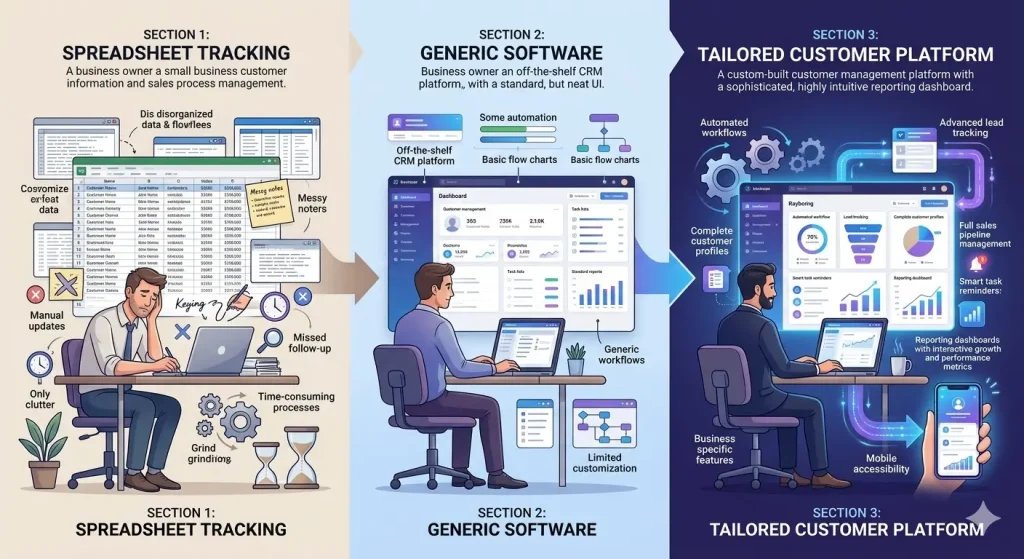
Custom CRM development allows a business to prioritize the customer information, sales stages and reports that its team actually uses. Many small business owners start with free or low-cost tools. That is not wrong. In fact, using a simple platform at the beginning can help you understand what your business needs. But as your processes become more specific, a generic tool can become limiting.
Small businesses often have unique workflows. A cleaning company may need to track site inspections, recurring contracts, and team schedules. A construction company may need project stages, quotations, site visits, and client approvals. A jewelry shop may need customer preferences, repair jobs, layaway payments, and repeat purchase reminders. A training provider may need student inquiries, class schedules, payment status, and certificate tracking.
A custom customer relationship manager gives you control over those workflows. It can connect sales, support, billing, marketing, and reporting in one place.
Tailoring CRM to Your Business Needs
The biggest advantage of custom development is fit. Your business should not be forced to work around software built for a different industry. The software should work around your actual process.
A custom crm can include the exact fields, stages, user roles, reports, and automations your business needs. Instead of a generic “lead status,” you can create stages such as New Inquiry, Consultation Booked, Quotation Sent, Follow-up Needed, Approved, In Production, Completed, and After-Sales Support.
This matters because small teams need clarity. When everyone knows the next step, fewer opportunities fall through the cracks. The owner can see what is pending, the sales team can prioritize hot leads, and the admin team can support customers without asking the same questions again and again.
A tailored customer relationship manager also improves accountability. You can track who handled each lead, how long it took to respond, how many follow-ups were made, and which marketing channels produced real customers.
For related insights, read about the benefits of CRM software.
Cost Efficiency and ROI
The cost of custom CRM development depends on the number of users, modules, automations, integrations and reporting requirements. Some business owners avoid custom crm development because they assume it is expensive. The honest truth is this: custom software costs more upfront than a basic subscription, but it can save more money long term when it removes repeated manual work, reduces lost leads, and improves customer retention.
Think of one missed customer who could have spent PHP 50,000, $1,000, or more over time. Multiply that by several missed leads every month, and the cost of disorganization becomes real.
A custom customer relationship manager can also reduce subscription overload. Many small businesses pay for separate tools for forms, email reminders, reporting, project tracking, and customer support. A custom platform can combine the most important functions into one system, making operations cleaner and easier to manage.
The return on investment often comes from faster response times, better sales tracking, stronger repeat business, and fewer admin mistakes. For small businesses, that is not just convenience. That is survival and growth.
Key Features of an Effective Custom System
A powerful system does not need to be complicated. The goal is not to build fancy features nobody uses. The goal is to solve real problems.
Here are the key features worth considering:
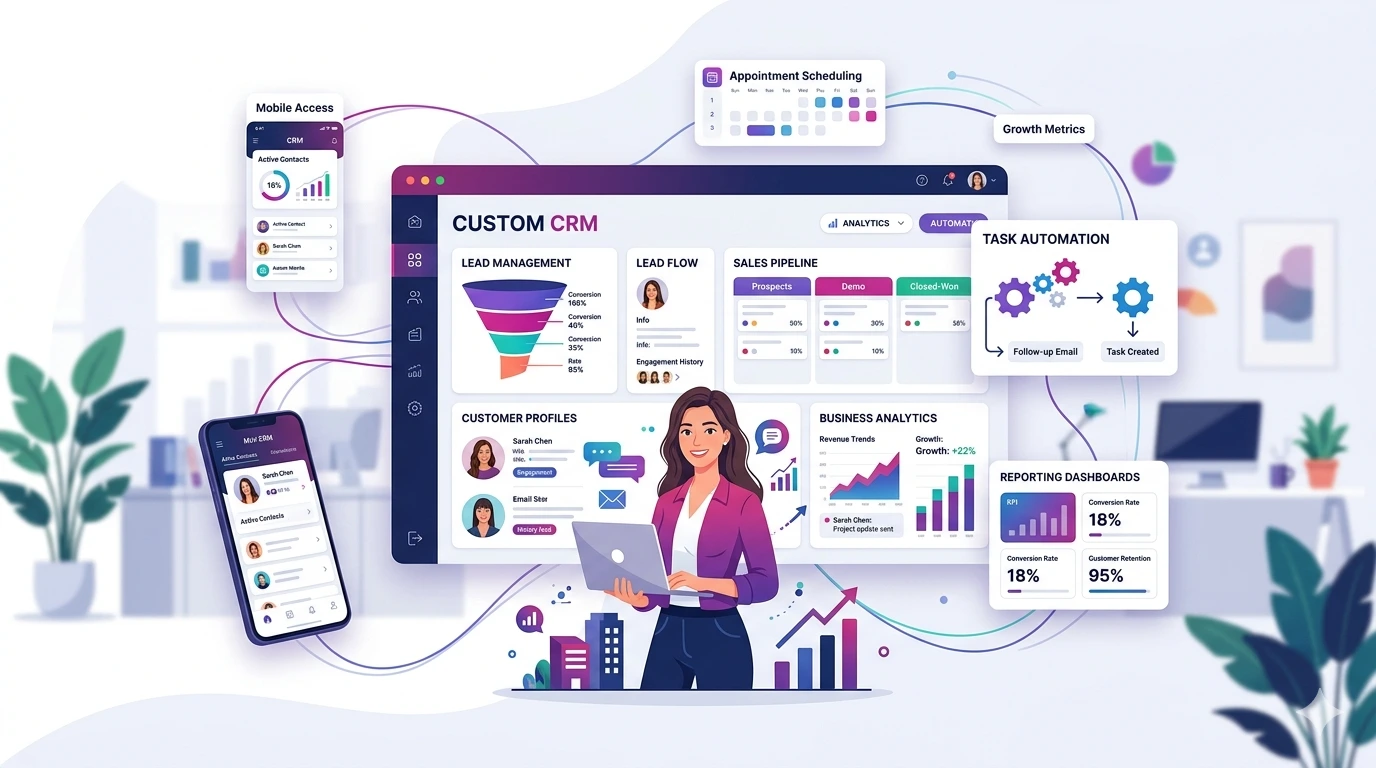
Lead and contact management: Store customer names, phone numbers, emails, locations, lead sources, notes, and communication history in one place.
Sales pipeline tracking: Track every opportunity from new inquiry to closed deal. This helps owners see where money is stuck and which leads need attention.
Task and follow-up reminders: Set reminders for calls, emails, meetings, quotations, renewals, and after-sales check-ins. This is one of the most valuable features for busy teams.
Quotation and proposal tracking: Save quotation details, monitor approval status, and follow up before leads go cold.
Customer support history: Record complaints, requests, service issues, and resolutions so customers do not need to repeat themselves.
Automation: Automate welcome emails, follow-up reminders, renewal notices, birthday greetings, payment reminders, and customer feedback requests.
Reports and dashboards: View sales performance, lead sources, conversion rates, team activity, pending tasks, and customer retention trends.
Role-based access: Give each staff member access only to what they need. Owners, managers, sales staff, support teams, and finance users can have different permissions.
Integrations: Connect the customer relationship manager with website forms, email, SMS, payment platforms, accounting tools, calendars, and marketing campaigns.
You can also explore our website development services if you want your website forms to connect directly to your crm.
Implementation: Steps to Get Started with Custom Development
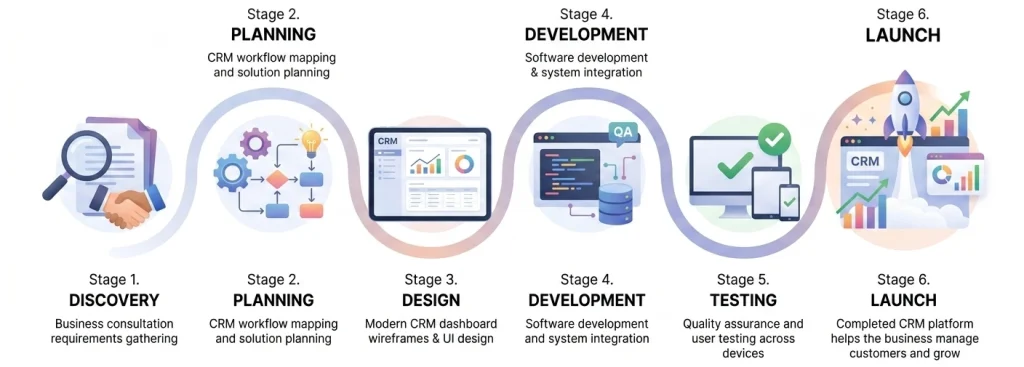
A successful custom CRM development project begins with workflow analysis before interface design or programming starts. Building a custom platform should not start with coding. It should start with understanding your business process.
Step 1: Map your current workflow. Write down how leads enter your business, who handles them, what happens next, and where delays usually happen. Be honest. If your team currently uses notebooks, Excel, Messenger, and email at the same time, document it.
Step 2: Identify your biggest pain points. Are you losing leads? Forgetting follow-ups? Struggling with reports? Repeating customer questions? Missing renewal opportunities? Your system should solve the most painful issues first.
Step 3: Define your user roles. Decide who will use the platform. Common roles include owner, admin, sales staff, support staff, finance team, and manager. Each role should have clear access.
Step 4: Choose your must-have features. Start lean. A small business does not need everything on day one. Focus on contact management, lead tracking, follow-ups, reporting, and customer history first. More advanced features can come later.
Step 5: Plan integrations. Your platform should connect with the tools that already matter to your business, such as your website, email, calendar, payment gateway, or accounting software.
Step 6: Build, test, and train. Let real users try the system before full launch. Train the team properly because even good software fails when people do not know how to use it.
Step 7: Improve over time. A custom crm should grow with your business. After launch, review what is working, what users ignore, and what needs improvement.
For businesses planning a more complete digital setup, our article on how CRM improves customer retention can help you connect customer data with repeat sales.
FAQs
Is custom development only for large companies?
No. A custom crm can be very useful for small businesses, especially those dealing with repeat customers, multiple sales channels, service requests, quotations, or follow-ups. The system can start small and expand over time.
How long does it take to build a custom customer relationship manager?
The timeline depends on the features. A simple version may take a few weeks, while a more advanced system with integrations and dashboards can take longer.
Can a custom CRM connect to my website?
Yes. Your website forms can send inquiries directly into your customer relationship manager. This helps your team respond faster and track every lead properly.
Is a custom CRM better than using ready-made software?
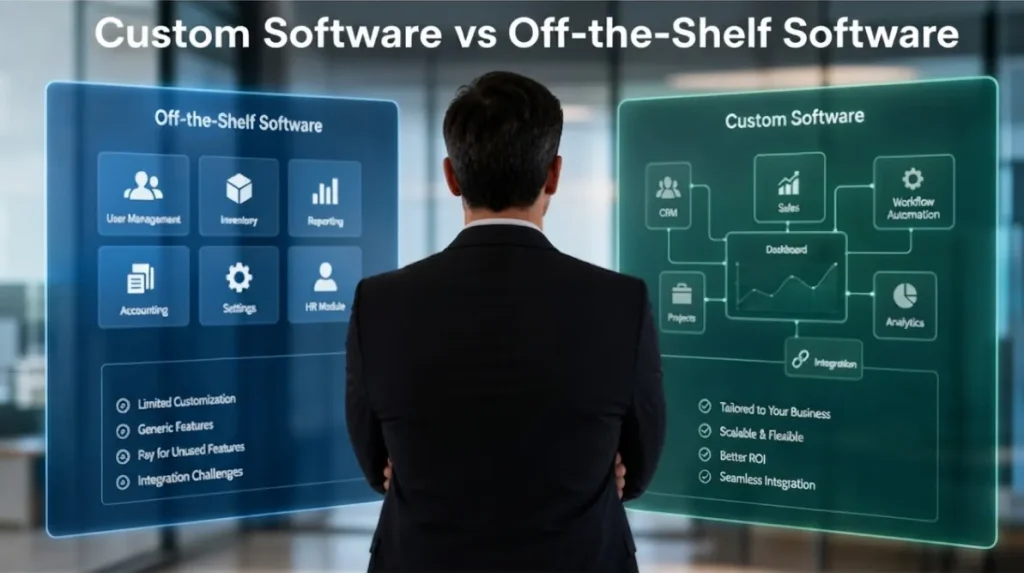
It depends on your needs. Ready-made platforms are good for basic use. A custom crm is better when your workflow is specific, your team needs special reporting, or you want full control over features and integrations.
What is the most important CRM feature for small businesses?
Follow-up tracking is one of the most important features. Many small businesses lose sales not because the customer said no, but because nobody followed up at the right time.
How can CRM help with marketing?
It helps you understand where leads come from, which campaigns convert, and which customers are ready for repeat offers. It can support email marketing, SMS campaigns, remarketing, and customer segmentation. You can pair it with search engine marketing to track campaign performance more clearly.
Small business growth depends on relationships. Customers want quick replies, organized service, personal attention, and consistent follow-up. When customer information is scattered, the business becomes harder to manage.
A well-planned customer relationship manager helps you capture leads, manage opportunities, track communication, automate reminders, improve customer service, and make better decisions. It gives small business owners the visibility they need to stop operating blindly.
Custom CRM development can become a practical investment when spreadsheets and generic platforms can no longer support the business properly. The best time to consider custom CRM development is when your current process starts slowing you down. If you are missing leads, depending too much on spreadsheets, struggling to track follow-ups, or asking your team the same customer questions every week, your business is ready for a better system.
Start with your pain points. Keep the first version practical. Build around your real workflow. Then improve the platform as your business grows. That is how small businesses turn customer data into stronger service, better sales, and long-term loyalty.
For a complete digital growth strategy, explore Brayne Digital’s digital marketing services and social media marketing support to connect your customer management system with lead generation and brand growth.