Custom software development cost in the Philippines depends on the size of the project, features, technology stack, design requirements, integrations, timeline and the level of support needed after launch. Custom software development cost in the Philippines depends on the size of the project, features, technology stack, design requirements, integrations, timeline, and the level of support needed after launch. For businesses that need a system built around their actual workflow, custom software can be a smarter long-term investment than forcing daily operations into generic tools that do not fully match the business.
In simple terms, there is no single fixed price for custom software development. A small internal business tool may cost much less than a full ERP system, SaaS platform, mobile app, or multi-branch management system. The more users, features, automations, integrations, reports, and security requirements your project needs, the higher the cost will be.
In the Philippines, custom software development is often more affordable compared with development markets like the United States, Canada, Australia, or the United Kingdom. Industry pricing references show that Philippine software development rates vary widely depending on seniority, specialization, location, and project complexity. Some 2026 estimates place Philippine development rates around $18 to $65 per hour depending on skill level, while some listings show Philippine software companies commonly positioned between $25 and $99 per hour depending on the provider and project scope. (Hireplicity)
That said, businesses should not choose a software development partner based on price alone. A cheap system that fails, performs poorly, or cannot scale will cost more in the long run. The better question is not only “How much does custom software development cost?” but also “What value will this system create for the business?”
What Is Custom Software Development?
Custom software development is the process of designing, building, testing, deploying, and maintaining software created specifically for the needs of a business or organization.
Unlike ready-made software, custom software is not built for everyone. It is built around your operations, workflows, users, departments, approval processes, customer journey, reporting needs, and business goals.
Examples of custom software include:
- Internal management systems
- CRM platforms
- ERP systems
- POS systems
- Inventory management systems
- Booking systems
- HR management systems
- Customer portals
- Admin dashboards
- SaaS platforms
- Mobile applications
- Logistics systems
- Real estate listing platforms
- School management systems
- Clinic and pharmacy systems
- Membership and affiliate platforms
- AI automation systems
For many growing businesses, custom software becomes necessary when spreadsheets, manual processes, and generic tools can no longer support daily operations properly.
Custom Software Development Cost in the Philippines
Custom software development cost in the Philippines can vary significantly. As a general estimate, simple systems may start from hundreds of thousands of pesos, while more advanced platforms can reach millions of pesos depending on complexity. Comparing custom software development cost in the Philippines by project type helps businesses establish a more realistic initial budget.
Here is a practical pricing guide:
Project Type | Estimated Cost Range |
Simple internal system | PHP 150,000 to PHP 350,000 |
Basic business web application | PHP 250,000 to PHP 600,000 |
Custom CRM or admin dashboard | PHP 300,000 to PHP 900,000 |
POS or inventory system | PHP 350,000 to PHP 1,200,000 |
Mobile app with backend system | PHP 500,000 to PHP 2,000,000+ |
ERP or multi-module business system | PHP 900,000 to PHP 3,500,000+ |
PHP 1,000,000 to PHP 5,000,000+ | |
AI automation or integration-heavy platform | PHP 500,000 to PHP 3,000,000+ |
These are only estimated ranges. The actual cost depends on the scope, features, technology stack, development team, timeline, third-party integrations, hosting requirements, and long-term maintenance needs.
For mobile applications specifically, some Philippine app development cost references estimate small basic apps from around PHP 150,000 to PHP 400,000, medium-sized apps from around PHP 400,000 to PHP 1.5 million, and large complex apps from PHP 1.5 million and above.
For custom business software, pricing can be higher when the system includes advanced dashboards, payment gateways, multi-user roles, automation, mobile apps, AI features, APIs, reporting modules, or enterprise-level security.
Main Factors That Affect Software Development Pricing
Software development pricing is affected by many things. Two businesses may both ask for a “custom system,” but the actual cost can be completely different based on what the system needs to do.
1. Project Scope
The bigger the project, the higher the cost.
A simple dashboard with login, user management, and basic reports will cost less than a complete ERP system with inventory, accounting, HR, sales, procurement, approvals, branches, and analytics.
Before asking for a quotation, businesses should clearly define what they want the software to accomplish.
Good scope questions include:
- What problem should the system solve?
- Who will use the system?
- What are the main modules?
- What data will be stored?
- What reports are needed?
- What processes should be automated?
- What third-party tools should be connected?
- Does the system need a mobile app?
- Will customers, staff, vendors, or admins use it?
The clearer the scope, the more accurate the pricing.
2. Improved Productivity
Every feature adds planning, design, development, testing, and maintenance work.
Common features that affect cost include:
- User registration and login
- Admin dashboard
- Role-based access
- Customer management
- Staff management
- Inventory tracking
- Payment processing
- Booking calendar
- Notifications
- Email automation
- SMS integration
- Reports and analytics
- File uploads
- Mobile responsiveness
- Mobile app access
- API integrations
- AI chatbot
- Workflow automation
- Audit logs
- Multi-branch support
- Subscription billing
- Vendor management
A system with 10 simple features will not cost the same as a system with 50 complex features. This is where many clients underestimate the development cost.
3. UI and UX Design Requirements
Design also affects pricing.
A basic internal tool may only need a clean and functional interface. A customer-facing SaaS platform, ecommerce system, or mobile app needs stronger UI and UX because users expect a smooth, modern, and professional experience.
Design costs increase when the project needs:
- Custom dashboard layouts
- Mobile app interface design
- Customer portal design
- Interactive charts
- Complex forms
- Multi-step onboarding
- Custom icons and graphics
- Brand-based interface design
- User journey planning
- Prototype design before development
Good design is not just about beauty. It affects usability, productivity, customer satisfaction, and adoption.
4. Technology Stack
The technology stack also affects the cost.
Some projects can be built with common technologies like Laravel, Vue, React, Node.js, Flutter, or WordPress with custom development. Others may need more advanced cloud infrastructure, AI tools, machine learning, real-time communication, or complex API architecture.
A simple Laravel web application will usually cost less than a SaaS platform with cloud infrastructure, background jobs, payment subscriptions, mobile apps, and AI-powered automation.
Common technologies used for custom software may include:
- Laravel
- Vue.js
- React
- Node.js
- Python
- Flutter
- MySQL
- PostgreSQL
- Firebase
- AWS
- Google Cloud
- Cloudflare
- REST APIs
- Third-party payment gateways
- AI and automation APIs
The more specialized the technology, the higher the development cost may become.
5. User Roles and Permissions
Systems with multiple user roles need more logic and testing.
For example, a simple system may only have two roles:
- Admin
- User
But a business system may need:
- Super Admin
- Manager
- Staff
- Accountant
- Customer
- Vendor
- Branch Admin
- HR Officer
- Sales Agent
- Auditor
Each role may have different permissions, dashboards, data access, approval rights, and restrictions.
Role-based access is very important for security, but it increases development time because every action must be properly controlled and tested.
6. Third-Party Integrations
Integrations can make software more powerful, but they also add cost.
Common integrations include:
- Payment gateways
- SMS providers
- Email services
- Accounting systems
- Ecommerce platforms
- CRM systems
- Google Maps
- Google Calendar
- Social media login
- Shipping providers
- Inventory tools
- AI APIs
- Analytics tools
- Cloud storage
- HR and payroll systems
API integration helps businesses connect systems and automate data flow, but it requires planning, development, testing, error handling, and ongoing monitoring.
If the third-party system has poor documentation or limited API access, integration may take longer and cost more.
7. Mobile App Requirements
If the project includes Android and iOS apps, the cost increases.
A business may need:
- Web-based admin dashboard
- Android app
- iOS app
- Customer mobile app
- Staff mobile app
- Push notifications
- App store deployment
- Mobile payment support
- Mobile offline access
- Mobile user authentication
Mobile apps are not just smaller versions of websites. They require their own design, development, testing, deployment, updates, and platform compliance.
This is why a system with mobile apps will usually cost more than a web-only system.
8. Security Requirements
Security should never be treated as optional.
A custom system may store customer records, financial data, employee information, transactions, documents, or business reports. If the software is not secure, the business can face serious operational, legal, and reputational risks.
Security-related features may include:
- Secure login
- Password reset
- Two-factor authentication
- Role-based access
- Data encryption
- Activity logs
- Audit trails
- Secure file uploads
- Database protection
- Backup systems
- Session management
- Input validation
- Protection against common web attacks
The more sensitive the data, the more security planning is needed.
9. Reports and Analytics
Reporting features can also affect the cost.
Simple reports may include basic tables and downloadable records. Advanced reports may include charts, filters, date ranges, branch comparisons, user performance, sales analytics, inventory trends, financial summaries, and export options.
Examples of reports include:
- Sales reports
- Inventory reports
- Customer reports
- Staff performance reports
- Appointment reports
- Payment reports
- Branch reports
- Revenue reports
- Audit logs
- Marketing reports
- Operational dashboards
Business owners love reports, and rightly so. But every report needs accurate data structure, queries, filters, and testing.
10. Timeline
Urgent projects often cost more.
If a business wants a system built quickly, the development team may need to assign more people, work longer hours, or prioritize the project over other work. This can increase the cost.
A realistic timeline allows better planning, cleaner development, stronger testing, and fewer mistakes.
For serious business systems, rushing the project usually creates problems later.
Cost by Type of Software Project
Different software projects have different levels of complexity. Below is a more detailed breakdown.
Simple Internal Business System
A simple internal system may include login, user management, forms, records, basic reports, and an admin dashboard.
Estimated cost: PHP 150,000 to PHP 350,000
Best for:
- Small businesses
- Simple record management
- Basic internal operations
- Replacing spreadsheets
- Basic team tracking
Example features:
- Login
- Dashboard
- Staff accounts
- Customer records
- Basic forms
- Basic reports
- Export to Excel
- Activity logs
Custom Web Application
A custom web application is usually more advanced than a simple internal tool. It may include user portals, workflows, dashboards, integrations, automated notifications, and multiple user roles.
Estimated cost: PHP 250,000 to PHP 900,000
Best for:
- Service businesses
- Agencies
- SMEs
- Clinics
- Schools
- Real estate firms
- Logistics companies
- Membership organizations
Example features:
- Admin panel
- Customer portal
- Staff dashboard
- Booking system
- Notifications
- Reports
- Payment integration
- Document uploads
- User permissions
Custom CRM System
A CRM helps businesses manage leads, customers, sales pipelines, follow-ups, communication, and customer relationships.
Estimated cost: PHP 300,000 to PHP 1,000,000+
Best for:
- Sales teams
- Service companies
- Real estate agencies
- Insurance companies
- Marketing agencies
- B2B companies
Example features:
- Lead management
- Customer profiles
- Sales pipeline
- Follow-up reminders
- Email templates
- Notes and activities
- Sales reports
- Team assignments
- Contact history
POS and Inventory System
A custom POS system helps businesses manage sales, stock, customers, discounts, payments, and reports.
Estimated cost: PHP 350,000 to PHP 1,200,000+
Best for:
- Retail shops
- Restaurants
- Barber shops
- Salons
- Pharmacies
- Service businesses
- Multi-branch stores
Example features:
- Sales screen
- Product catalog
- Inventory tracking
- Discounts
- Loyalty program
- Receipts
- Cashier accounts
- Daily sales report
- Branch management
- Payment tracking
ERP System
An ERP system is usually a larger platform that connects different business departments and processes.
Estimated cost: PHP 900,000 to PHP 3,500,000+
Best for:
- Medium-sized businesses
- Large companies
- Multi-department organizations
- Manufacturing businesses
- Logistics companies
- Construction companies
- Corporate operations
Example modules:
- Finance
- HR
- Inventory
- Procurement
- Sales
- CRM
- Project management
- Payroll
- Asset management
- Reports
- Approvals
- Audit logs
SaaS Application
A mobile app project usually includes the mobile app itself plus a backend dashboard for managing users, content, transactions, notifications, and reports.
Estimated cost: PHP 500,000 to PHP 2,000,000+
Best for:
- Customer service apps
- Booking apps
- Ecommerce apps
- Delivery apps
- Membership apps
- Marketplace apps
- Community apps
Example features:
- Android app
- iOS app
- Admin dashboard
- User accounts
- Push notifications
- Payments
- Order tracking
- Booking system
- Customer support
- Profile management
Custom Software Development Cost Breakdown
A mobile app project usually includes the mobile app itself plus a backend dashboard for managing users, content, transactions, notifications, and reports.
Estimated cost: PHP 500,000 to PHP 2,000,000+
Best for:
- Customer service apps
- Booking apps
- Ecommerce apps
- Delivery apps
- Membership apps
- Marketplace apps
- Community apps
Example features:
- Android app
- iOS app
- Admin dashboard
- User accounts
- Push notifications
- Payments
- Order tracking
- Booking system
- Customer support
- Profile management
Custom Software Development Cost Breakdown
A software development project is not only about coding. Professional software development includes several stages.
1. Discovery and Planning
This is where the team studies the business problem, project goals, users, workflows, and required features.
Typical activities include:
- Business requirement gathering
- Workflow analysis
- Feature planning
- User role planning
- Technical feasibility review
- Cost estimation
- Timeline planning
This stage is important because poor planning usually leads to scope creep, delays, and higher costs.
2. UI and UX Design
The design stage focuses on how the software will look and how users will interact with it.
Typical activities include:
- Wireframes
- User flow design
- Dashboard layout
- Mobile design
- Form design
- Prototype design
- Design review
Good UI and UX reduce confusion and make the system easier for staff, customers, and admins to use.
3. System Architecture
This stage defines how the software will be structured technically.
It includes:
- Database planning
- Module structure
- API planning
- Security architecture
- Hosting requirements
- Integration planning
- Scalability planning
This is very important for systems that are expected to grow.
4. Development
This is the actual coding stage.
It may include:
- Frontend development
- Backend development
- Database development
- API development
- Admin dashboard development
- Mobile app development
- Integration development
- Automation development
Development usually takes the largest part of the project budget.
5. Testing and Quality Assurance
Testing ensures that the system works properly before launch.
Testing may include:
- Functional testing
- User role testing
- Form testing
- Mobile responsiveness testing
- Browser testing
- Security testing
- Payment testing
- Integration testing
- Bug fixing
Skipping proper testing is one of the fastest ways to launch a problematic system.
6. Deployment
Deployment is the process of launching the software to a live server, cloud environment, or app store.
It may include:
- Server setup
- Domain and SSL setup
- Database migration
- Cloud configuration
- App store submission
- Backup configuration
- Monitoring setup
7. Training and Documentation
Many businesses forget this part, but it matters.
A system is only useful if people know how to use it.
Training may include:
- Admin training
- Staff training
- User manuals
- Video walkthroughs
- SOP documentation
- Technical documentation
8. Maintenance and Support
Software needs ongoing care after launch.
Maintenance may include:
- Bug fixes
- Security updates
- Server monitoring
- Feature improvements
- Backup checks
- Performance optimization
- User support
- Compatibility updates
Businesses should budget for monthly or yearly maintenance after the software goes live.
Why Cheaper Software Is Not Always Better
Cheap software can look attractive at first. But if the system is poorly built, the business may end up paying more later.
Common problems with very cheap software include:
- Poor code quality
- Weak security
- No documentation
- Slow performance
- Poor user experience
- Missing features
- No proper testing
- No backup plan
- No maintenance support
- Difficult future upgrades
- Developer disappearing after payment
The real cost of software is not just the initial development fee. It includes the cost of maintenance, future upgrades, staff adoption, downtime, errors, and lost productivity.
A cheap system that causes daily problems is not cheap. It is a liability.
Businesses should choose a software development partner that understands both technology and business operations.
How to Choose the Right Software Development Partner
Choosing the right software development company in the Philippines is one of the most important decisions in the project. Businesses evaluating custom software development cost in the Philippines should compare experience, technical quality, communication and post-launch support—not price alone.
Here are things to check before hiring a provider.
1. Review Their Experience
Check whether the company has experience building systems similar to what you need.
Ask about:
- Previous projects
- Industry experience
- Software modules developed
- Technology stack
- Project process
- Maintenance support
- Client communication
2. Ask About Their Development Process
A serious software company should have a clear process.
Look for a process that includes:
- Discovery
- Planning
- UI and UX design
- Development
- Testing
- Deployment
- Training
- Maintenance
If the process is not clear, the project can become messy quickly.
3. Check Communication
Software projects need good communication.
The development partner should be able to explain technical details in a way business owners can understand. They should also provide updates, ask the right questions, document requirements, and clarify scope before development starts.
Poor communication leads to poor outcomes.
4. Ask About Maintenance
Do not only ask how much it costs to build the system. Ask how much it costs to maintain it.
Important questions include:
- Do you offer monthly support?
- How are bugs handled?
- What happens if we need new features?
- Who manages hosting?
- How are backups handled?
- How are updates managed?
- What is the response time for urgent issues?
5. Avoid Vague Quotations
A proper quotation should explain what is included.
It should mention:
- Project scope
- Features
- Deliverables
- Timeline
- Payment terms
- Exclusions
- Maintenance
- Revision policy
- Ownership
- Hosting requirements
A vague quotation may lead to conflict later.
How Brayne Software Helps Businesses Build Custom Systems
Brayne Software helps businesses plan, design, and develop custom software solutions built around real business needs.
Our software development services include:
- Custom Software Development
- Custom Web Application Development
- Internal Business Systems Development
- SaaS Application Development
- Mobile App Development
- API Development and System Integration
- AI and Automation Services
- Admin Dashboards and Portals
- CRM and ERP Development
- POS and Inventory Systems
We work with businesses that want to improve operations, reduce manual work, centralize records, automate workflows, and build scalable digital systems.
Instead of forcing your business into software that does not fit, Brayne Software helps you build a system that matches how your business actually works.
FAQs
How much does custom software development cost in the Philippines?
The average custom software development cost in the Philippines varies because every system has different users, workflows, integrations and security requirements.. The final cost depends on the number of features, user roles, integrations, design complexity, database structure, mobile app requirements, and long-term support.
Why does custom software cost more than ready-made software?
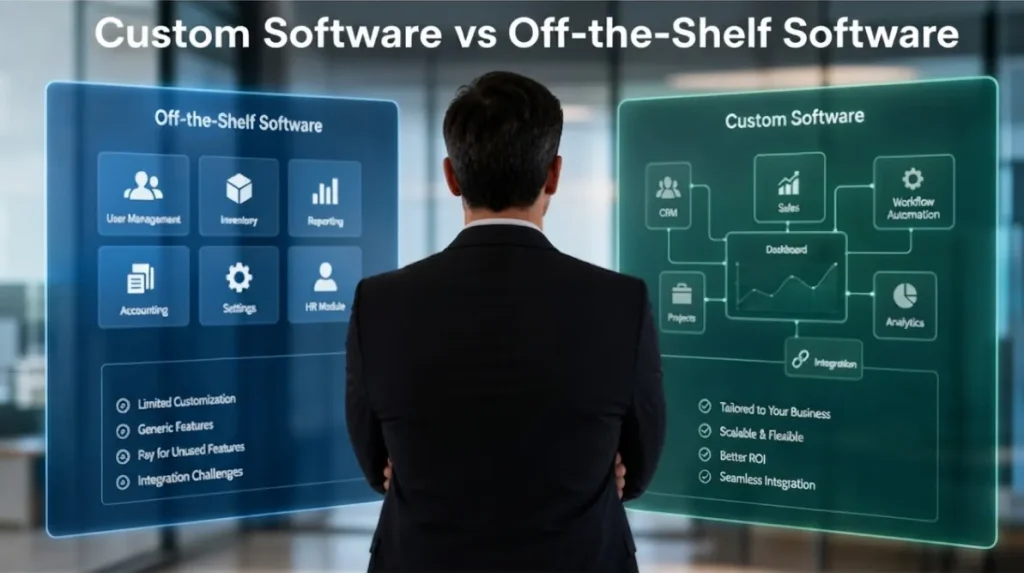
Custom software costs more upfront because it is designed specifically for your business processes, users, workflows, reporting needs, and integrations. Unlike ready-made software, you are not just paying for access. You are investing in a system built around your operations.
Is custom software worth it for small businesses?
Yes, custom software can be worth it for small businesses when manual work, spreadsheets, disconnected tools, and repeated errors are slowing down operations. It becomes more valuable when the business needs automation, reporting, better customer management, or internal workflow control.
How long does it take to build custom software?
A simple system may take 1 to 3 months, while a more advanced platform may take 4 to 12 months or longer. The timeline depends on project scope, number of modules, complexity, integrations, testing, and revisions.
What is the cheapest way to start a custom software project?
The cheapest practical way is to start with an MVP, or minimum viable product. This means building the most important features first, launching the system, then adding more features later based on actual business needs.
Can custom software be upgraded later?
Yes. A properly built custom software system can be upgraded with new features, integrations, reports, user roles, and automation as the business grows.
Ready to estimate your software project? Brayne Software can help you plan, scope, and develop a custom business system that fits your workflow, budget, and growth plans.
Contact Brayne Software today to request a consultation and project assessment.
Custom software development cost in the Philippines depends on the scope, features, complexity, design, integrations, mobile app requirements, security, and long-term support needed for the project.
A small internal tool may cost a few hundred thousand pesos, while a full ERP, SaaS platform, or mobile app ecosystem can cost millions. The right budget depends on what the software must do and how much value it can create for your business.
For growing businesses, custom software is not just an expense. It is an investment in better operations, faster workflows, stronger reporting, improved customer service, and long-term scalability.
If your business is struggling with spreadsheets, manual processes, disconnected tools, or software that does not match your workflow, it may be time to consider building a custom system.