Buying a new POS in the Philippines is not only a question of features and screens. Before a single sale goes through, the system has to fit the Bureau of Internal Revenue (BIR) rules for sales machines, and those rules have changed several times in the last few years. This checklist covers what to check first when you are choosing a BIR accredited POS, or building your own, so you do not discover a gap after go-live. It is a practical guide, not tax advice, so confirm your own situation with your accountant and your Revenue District Office (RDO).
Why “BIR-ready” matters before you choose a POS
Under BIR rules, a POS that issues invoices is a sales machine. It is not enough for the software to print a neat receipt. The exact system and version you use has to be accredited, each machine in each branch has to be registered, and the invoices it prints have to carry the information the BIR requires. If any of those pieces is missing, the problem lands on the business using the POS, not only on the vendor who sold it.
The good news is that the requirements are written down. The current policy for accrediting cash register machines (CRM), POS systems and similar sales software is Revenue Memorandum Order (RMO) No. 24-2023. Most of the checklist below comes straight from it and from the invoicing changes that followed.
Accreditation vs Permit to Use: two different things
The most common source of confusion is mixing up accreditation and the Permit to Use (PTU). They are separate steps with separate owners:
- Accreditation covers the POS system itself: a specific brand, model, software and version. The supplier or developer applies, submits a notarized sworn statement on the system’s features, and demonstrates the system to a BIR technical working group. The result is a Certificate of Accreditation.
- Permit to Use covers each machine your business actually runs. It is filed through the BIR’s Enhanced eAccReg system and approved by your RDO or the Large Taxpayers office. Each registered machine gets a Machine Identification Number (MIN).
Guides that walk through the 2026 BIR Citizen’s Charter describe the PTU flow this way: the POS supplier’s eAccReg account files the PTU application for the store, the RDO reviews it, and the business prints the approved PTU from its own eAccReg account. Ask your supplier to confirm the current process with you, because who files what has shifted over time.
One more distinction: a full computerized accounting system (CAS) is handled differently and receives an Acknowledgement Certificate, not a PTU. If your POS feeds a CAS, the POS tills still need their own accreditation and registration. A registered accounting system does not cover the machines that ring up sales.
The BIR accredited POS checklist
1. Ask for the Certificate of Accreditation, and match the version
Ask the vendor for a copy of the Certificate of Accreditation and check that it covers the exact software version and hardware you will run. RMO 24-2023 says the BIR posts a list of accredited sales machines and software on its website, so you can cross-check. Be careful with vendors who say accreditation is “in process” or who are about to ship a new major version, because major enhancements can require reaccreditation.
2. Confirm who files the Permit to Use for every machine
Every terminal needs its own PTU, including the second counter, the mobile tablet at the door and the till in your new branch. Ask the vendor to explain who files each PTU in eAccReg, how long they typically take to process, and what you need to prepare. Plan PTUs into your rollout schedule so a branch opening is not stuck waiting on paperwork.
3. Check the required system features
RMO 24-2023 lists the features a sales machine must have to be accredited. Ask the vendor to show you each one during a demo:
- Accumulated grand total sales that cannot be reset
- Tamper-free design and non-volatile memory, so data survives a power loss
- An activity or transaction log, and an e-journal or audit journal
- Sales readings and backend reports
- A sequential series of invoices with no gaps or duplicates
- Reprint and “push” functionality
- A verification or validation seal
- Data retention
- Sales data transmission
You do not need to be a programmer to check these. Ask the vendor to run a test sale, a void, a refund and an end-of-day reading in front of you, and ask where each record is stored.
4. Make sure the printout says “Invoice”, not “Official Receipt”
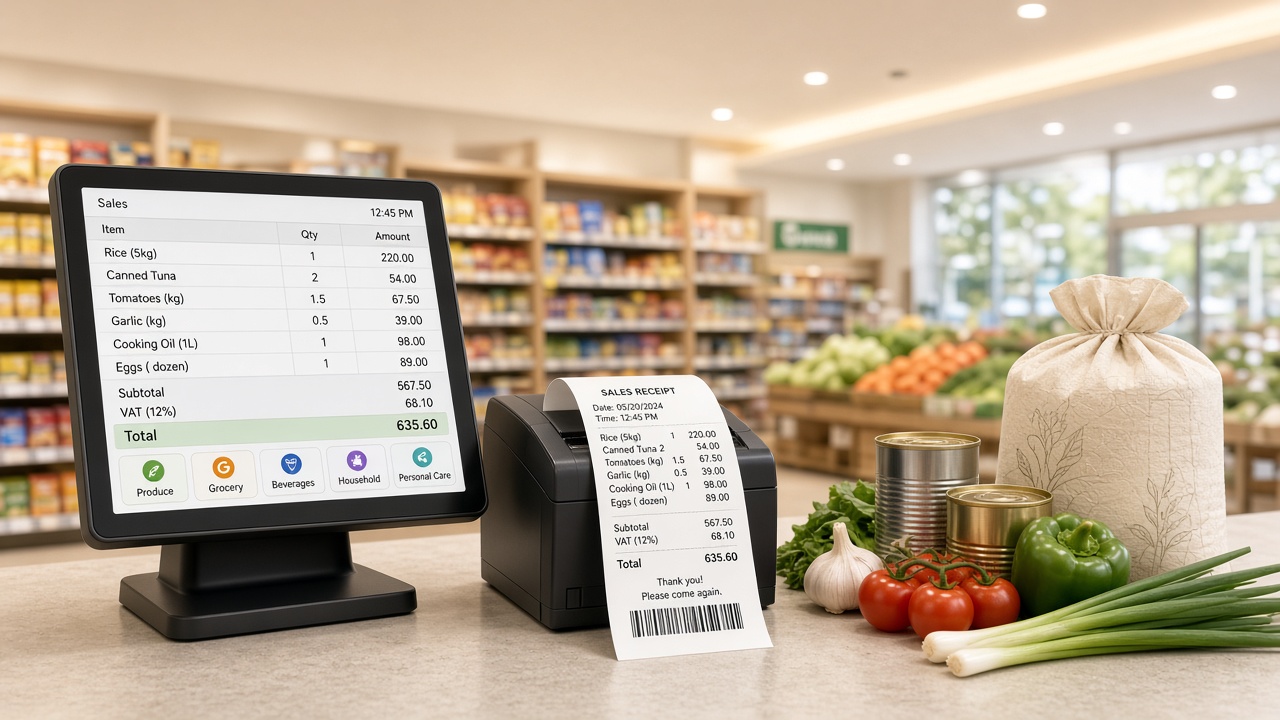
Under the Ease of Paying Taxes (EOPT) Act and Revenue Regulations No. 7-2024, the invoice replaced the official receipt as the primary document for recording sales of goods and services. RR No. 11-2024 let POS users rename “Official Receipt” to “Invoice” or a more specific term such as “Cash Invoice” or “Service Invoice”, continuing the serial series, and treated that change as a minor enhancement. It also set a transition period that ended on December 31, 2024. If a POS you are evaluating still prints “Official Receipt” as the main sales document, treat that as a red flag and ask the vendor to explain.
5. Check the invoice contents
The invoice must carry the seller and transaction details the BIR requires, plus machine details once the POS is registered, such as the MIN, the machine’s serial number and the PTU number. Ask the vendor for a sample invoice from a live, registered client and compare it with the requirements your accountant gives you. Pay attention to VAT and VAT-exempt breakdowns, discounts for senior citizens and persons with disabilities if they apply to you, and how voids and returns appear.
6. Ask about e-invoicing and sales reporting
The BIR is moving toward electronic invoicing. RR No. 11-2025 lists which taxpayers must issue electronic invoices, and it names taxpayers using POS systems as a group that will be covered once the BIR has a system ready to receive the data. Revenue Memorandum Circular (RMC) No. 98-2026 sets a December 31, 2026 deadline for the groups already covered, such as large taxpayers, e-commerce sellers and taxpayers using CAS or computerized books with e-invoicing. It also says a printed POS invoice only counts as an electronic invoice if the system can send it to the buyer electronically and the data can be transmitted to the BIR.
Even if your business is not covered yet, ask the vendor how the system will handle electronic invoices and sales data transmission when the rules reach you. A POS that cannot export structured sales data will be expensive to replace later.
7. Plan for multiple branches and devices
Each branch registers its own machines, and each machine has its own invoice series and readings. Ask how the POS keeps branch data separate for BIR purposes while still giving you one view of sales and stock across all branches. If you also run inventory across locations, see our guide to internal business systems for how a POS can share data with stock, purchasing and reporting.
8. Check data access, backups and exit terms
RMO 24-2023 requires data retention, and your accountant will want reports long after a sale. Ask where your data lives, how backups work, how you export reports, and what happens to your records if you leave the vendor or the subscription ends. Get the answers in writing.
9. Ask who handles changes and enhancements
Businesses change: new branches, new payment methods, new service lines. Ask the vendor how they decide whether a change is a minor enhancement or one that needs reaccreditation, and who is responsible for informing the BIR. A vendor that has handled the 2024 invoice changes for existing clients can usually explain this clearly.
Building a custom POS? Read this first
Some businesses need a POS built around how they actually work, such as appointment-based services, a mix of retail and service sales, or close links to an existing inventory or accounting system. That is possible, but a custom POS that issues invoices is still a sales machine under RMO 24-2023. The order covers developers and taxpayer-users who build their own systems, not only commercial vendors, and it requires the same sworn statement, system demonstration and feature list.
That means BIR requirements belong in the scope from day one, not after the build. In practice:
- List the RMO 24-2023 features as acceptance criteria in the specification.
- Design the invoice layout, serial series, readings and audit logs before the user interface.
- Plan time for accreditation, the system demonstration and PTU registration in the project timeline.
- Keep a clean version history, since changes after accreditation may need to be reported or reaccredited.
- Design the data model so electronic invoicing and sales data transmission can be added without a rebuild.
Brayne builds custom systems for Philippine businesses, including Brayne POS, which runs bookings and sales at ERRA Barbers. If you are deciding whether to buy a ready-made POS or build one, our comparison of custom vs ready-made software walks through the trade-offs.
Questions to ask any POS vendor
- Can I see your Certificate of Accreditation, and does it cover the version I will use?
- Who files the Permit to Use for each of my machines, and what do you need from me?
- Can you demonstrate grand total, readings, the e-journal, reprints and voids?
- Can I see a sample invoice from a registered client?
- How will the system handle electronic invoicing and sales data transmission?
- How do you handle multiple branches and new terminals?
- How do I export my data, and what happens to it if I leave?
- Who decides whether a change needs reaccreditation, and who informs the BIR?
Frequently asked questions
What is the difference between BIR accreditation and a Permit to Use?
Accreditation approves a POS system and version, and it is applied for by the supplier or developer. A Permit to Use registers each machine a business uses, and each registered machine gets a Machine Identification Number.
Does every POS terminal need its own Permit to Use?
Yes. Each machine used to issue invoices is registered separately, including extra counters and machines in other branches.
Can I build my own POS and still be BIR compliant?
Yes, but the system must meet the same requirements as commercial POS software under RMO 24-2023, including the sworn statement, a system demonstration and the required features, before it can be registered for use.
Should my POS still print “Official Receipt”?
Under RR No. 7-2024 as amended by RR No. 11-2024, the invoice is the primary sales document, and POS users were required to rename “Official Receipt” to “Invoice” or a similar term by the end of the transition period. Check with your accountant if your system still prints “Official Receipt”.
Do POS users need to issue electronic invoices now?
RR No. 11-2025 says POS users will be covered once the BIR has a system to receive the data, while other groups have a December 31, 2026 deadline under RMC No. 98-2026. Confirm with your accountant which group your business is in.
Plan your POS project with Brayne
If you are replacing a POS, opening new branches, or considering a system built around your business, start with a short scoping exercise. Our Discovery Sprint maps your sales process, data and BIR requirements into a clear scope and estimate before any build starts. You can also tell us about your project, or see how we connect POS, inventory and accounting through API and system integration.